
One of the best things about Magento is its open source software, which gives companies the agility to completely customize their sites to meet the needs of their customers.
However, the virtually endless possibilities for tailoring this popular eCommerce platform means you also need to ensure you uphold the integrity of your site. This includes every measure necessary to protect the safety of your business internals, your customers’ information, and your collective privacy.
You know, all the things that cybercriminals just love getting their hands on.
Fortunately, Magento makes this easy to do by creating and releasing security patches.
What Are Magento Security Patches?
When a security hazard is discovered, Magento’s programmers create updates, known as “a patch”, to fix vulnerabilities that could otherwise be exploited by unauthorized users. These security patches are created and released as self-installing patch scripts.
The updates are also released regularly so that companies can quickly adapt and continue with their business without the looming threat of hackers accessing their vital information.
Once installed, security patches identify the existing code they were designed to fix and make the necessary updates automatically.
In other words, Magento’s security patches are designed to be as easy-as-possible to implement. Still, it**’s important that you rely on a certified Magento developer** to install your security patches. Your site most likely runs on a number of extensions and custom code, so you want to work with experienced developers who can make certain the installation is effective.
That said, even if you are an experienced coder, you should never modify Magento security patches. They were designed with core code files in mind, so altering them in any way could actually cause the security patches to fail.
Cybercriminals would really appreciate that.

How Important Are Magento Security Patches?
In a word, “VERY.”
You probably have a million things going on, so when Magento releases a security patch, it can be tempting to add installation to your list of things to do.
You’ll get to it later.
Unfortunately, cybercriminals have a much shorter list of priorities and all of them involve getting their hands on the kinds of sensitive information they can use to harm your company and its clients.
Though cybercrime has, sadly, come a long way, exploiting sites that don’t have the latest security patches is still one of their favorite methods of finding victims.
In fact, according to an article by Trend Micro on cybercrime and security patches:
“Cybercriminals exploiting unpatched system vulnerabilities continue to be one of the top reasons enterprises suffer unauthorized intrusions.”
It’s not hard to see why.
Obviously, websites are extremely vulnerable when they don’t have new security patches.
However, companies like Magento also spread the word whenever they release new patches so that their clients can install them ASAP.
This means cybercriminals hear about these vulnerabilities, too.
Often, many of them know about the problem long before the announcement ever comes out. After all, that’s why the security patches are necessary in the first place.
Imagine a home security company announcing that they just discovered their systems no longer keep backdoors safe. That sign outside that lets potential burglars know your house is protected would suddenly look like an invitation.
So, it’s not just important that you install your Magento security patches.
It is absolutely vital that you install them right away.
The moment that announcement comes out, the clock is ticking.
How to Install Magento Security Patches
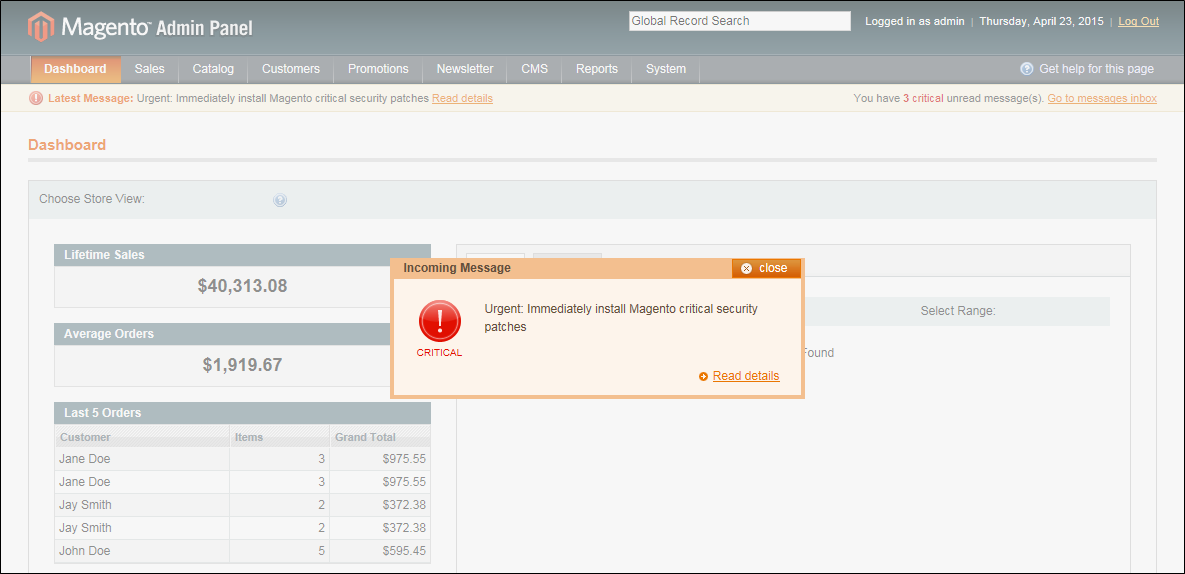
If Magento releases a new security patch, you’ll be notified one of two ways depending on which version your site is running.
For M1, Magento will notify you right away via email.
They also make it extremely easy to access their new security patches. You’ll find official security patches for M1 are released right on Magento’s security page:
Magento also periodically releases software updates for M1 that contain these security patches. So, even if you’re perfectly happy with the way M1 is currently running, it’s a good idea to install those updates ASAP for security purposes.
That said, with Magento 1 on its way out in June, it’s more important that you focus on Magento 2.
For M2, Magento only releases updates that contain multiple patches.
**If you’re curious about current Magento security patches that you may be without, you can always check the Magento Security Center to make sure your site is up-to-date.
**
Don’t Risk Your Magento Site’s Security
There’s absolutely no reason you need to wait when Magento has discovered a new vulnerability with their platform.
Remember, cybercriminals are really hoping you take your time.
As a Magento partner, we employ a staff of certified Magento developers who can make these important updates to your site.
First, we compare your site’s code to the new patch. Typically, this only takes about an hour.
Then, we will give you an estimate of how much time it will take to install the Magento security patch your website needs. Many patches are simple, but some are more extensive and require more time.
Furthermore, if any previously released security patches are missing, they must all be properly installed before the newest one can be implemented. We’ll let you know if this is the case when we give you your customized estimate.
Contact us if you have any questions about installing Magento security patches or if you are ready to have our team of certified Magento developers ensure your website is protected by the most up-to-date measures.
Check out more great eCommerce products, services, and resources from IWD
eCommerce Development
- WooCommerce Development Company
- Online Marketing Consulting
- eCommerce Email Marketing Services
- eCommerce Digital Marketing Agency
- Magento Website Development Company
- Top BigCommerce Developers
Products & Extensions
- Magento 2 B2B
- Address Validation Service
- Recurring Payment Service
- Magento Extensions for eCommerce
- Free Store Locator Shopify
- Product Videos for Marketing
- POS eCommerce Solutions
checkout other great extension
Top Blog Posts
- The Difference Between B2B and B2C
- Magento vs Shopify
- Magento Hosting Price
- SEO for eCommerce Sites
- Shopify Certified Developer
- Hosting for Magento 2
- UX Design Company
Updated for 2026: The 2024-2026 Magento Security Patch Cycle
Adobe ships quarterly security patches for Adobe Commerce and Magento Open Source. Below is the patch deployment cadence we recommend, recent notable CVEs, and how we handle patching under our Magento support retainers.
- Quarterly release cadence. Adobe ships major Magento Open Source and Adobe Commerce patches in March, June, September, December. Out-of-band critical patches ship as needed (typically 1 to 2 per year for high-severity CVEs).
- Critical patches deploy within 48 hours under our support retainers. Standard patches within 1 week. Patch deployment includes composer dependency review, custom module compatibility verification, staging UAT, production deploy with rollback plan.
- Recent notable CVEs (2024 to 2026). CVE-2024-34102 (CosmicSting, critical RCE on 2.4.5/2.4.6/2.4.7). Patches shipped within 1 week of disclosure. Most active stores patched within 2 weeks. Lagging stores were actively exploited.
- Adobe Commerce Cloud handles infrastructure patching automatically. Application-level Magento version upgrades still require dev work. Cloud isn't a 'patches happen automatically' arrangement for application code.
- On-prem Adobe Commerce + Magento Open Source require manual patching. Brands self-hosting need an established patch deployment process or an agency retainer to handle it. Without that, security debt accumulates fast.
Frequently asked questions
How urgent are Magento security patches?
Critical patches: deploy within 48 to 72 hours. Standard patches: within 1 to 2 weeks. CVE-2024-34102 (CosmicSting) showed the cost of delay: stores that hadn't patched within 2 weeks of disclosure were actively exploited in the wild. Patch hygiene is not optional for production ecommerce.
Do Adobe Commerce Cloud customers need to manage patches?
Partially. Adobe handles infrastructure-level patching (PHP, MySQL, OS, Fastly). Application-level Magento version upgrades and module patches still require dev work. Cloud reduces the patching surface but doesn't eliminate it.
What's the difference between a security patch and a version upgrade?
Security patch: targeted fix for a specific CVE, deployed on top of the current version. Version upgrade: full Magento minor/major version bump (e.g. 2.4.5 to 2.4.7), includes accumulated patches plus feature additions plus dependency updates. Both ship from Adobe; patches are smaller and faster, upgrades are more involved.
How do you test patches before production deploy?
Staging UAT process: deploy patch to staging environment, run automated regression tests on critical workflows (catalog browse, checkout, customer login, B2B quote flow if applicable), manual smoke test on top 10 pages, then production deploy with rollback plan ready. Standard turnaround: 4 to 24 hours from patch publication to staged + tested.
Do you handle Magento Open Source security patches separately from Adobe Commerce?
Yes. Both editions ship patches from Adobe. Cadence and severity ratings are the same. Open Source patches sometimes lag Adobe Commerce by 1 to 2 days but the security content is equivalent.
What happens if we skip a security patch?
Compounding risk. Each unpatched CVE creates exploitable surface area. PCI compliance becomes harder to maintain. Insurance carriers may flag the store. Most ransomware and card-skimmer attacks on Magento target known CVEs that brands hadn't patched in time.
Related reading
Magento support services · Magento maintenance · Adobe Commerce Cloud · Magento development services
If you're managing Magento security patches in-house and need an agency on retainer, book a 15-minute support fit call.