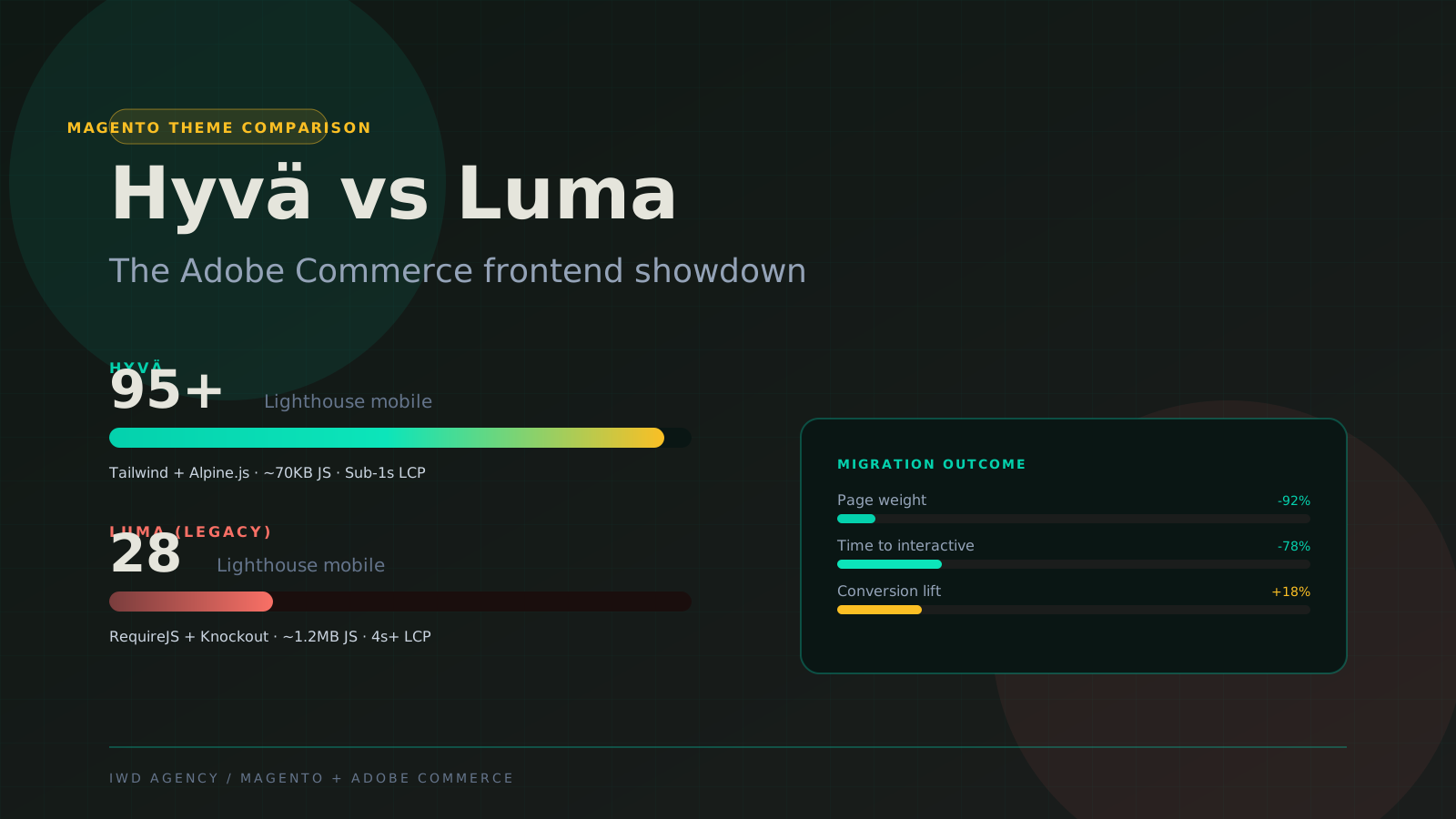
Hyva vs Luma is the single biggest theme decision Magento and Adobe Commerce teams make in 2026, and in practice it is less a contest than a transition. Hyva isn't just "a newer theme": it's a different front-end architecture that replaces Magento's legacy Knockout.js stack with Tailwind CSS plus Alpine.js. Luma has received no meaningful investment in years and is legacy in everything but name; new builds default to Hyva, and the remaining question for most stores is when and how to migrate, not whether. The result on Hyva is sub-2-second LCP on PDPs where Luma typically caps around 3 seconds, plus a meaningfully faster front-end developer workflow.
This guide is the side-by-side comparison we walk through on every Magento engagement that touches the theme layer. It's based on 50+ Hyva builds and 200+ Luma builds across IWD client work.

The 30-Second Verdict
If you're scanning, here's the short version:
- Hyva wins for new builds and brands that prioritize Core Web Vitals. Sub-2-second PDP LCP is realistic. Front-end dev cost is lower.
- Luma stays the right pick for stores with deep custom-module dependencies that haven't migrated yet, or for teams without the budget for a Hyva migration cycle.
- Both are platform-agnostic: Hyva runs on Magento Open Source AND Adobe Commerce. Adobe officially supports Hyva as of 2024, and Luma is effectively in maintenance mode.
Below is the full breakdown.
What Each Theme Actually Is
| Dimension | Hyva | Luma |
|---|---|---|
| Architecture | Tailwind CSS + Alpine.js | Knockout.js + RequireJS + LESS |
| License model | Paid (per-store, published pricing) | Free (ships native with Magento) |
| Released | 2020 by Hyva Themes (Vinai Kopp + team) | 2015 with Magento 2.0 |
| Adobe support | Officially supported (2024+) | Official Magento default theme |
| Bundled with Magento install? | No (separate license + install) | Yes (default theme) |
| Front-end dev experience | Modern: Tailwind utility-first + Alpine reactivity | Legacy: Knockout templates + RequireJS module graph |
| JavaScript on a typical PDP | ~50 to 100 KB after parse | ~700 KB to 1.2 MB after parse |
| B2B Edition compatibility | Full (B2B Edition UI ships native on Hyva) | Full (native Adobe Commerce B2B) |
Core Web Vitals: Where the Real Difference Shows Up
Performance is the headline reason Hyva exists. Below are typical Lighthouse mobile scores and Core Web Vitals we measure on client builds. These are not best-case lab numbers; they're typical real-store ranges across our portfolio.
The CLS delta matters most. Google's Core Web Vitals scoring counts CLS as a primary ranking signal, and Luma's Knockout-driven layout shifts consistently push it past the 0.1 threshold that triggers a "Poor" CLS classification in CrUX field data. Hyva's Alpine.js-driven reactivity has dramatically less layout shift because the DOM is mostly server-rendered.
Where Hyva Wins
Sub-2-second LCP is realistic, not aspirational
The performance numbers above are typical, not best-case. Hyva stores hit Lighthouse 90+ mobile and sub-2-second PDP LCP without performance heroics. Luma can match these numbers but requires significant optimization effort (image compression, deferred apps, critical CSS extraction, server-side caching tuning) that often hits 70 to 80 Lighthouse and stalls.
Front-end developer experience is dramatically better
Tailwind utility classes plus Alpine.js reactivity replaces Knockout templates plus RequireJS module graphs. New front-end engineers ramp up faster on Hyva; most know Tailwind already. Magento-specific theme expertise becomes less of a hiring bottleneck.
Smaller JavaScript footprint = better SEO
Luma ships 700 KB to 1.2 MB of JavaScript on a typical PDP after parse. Hyva ships 50 to 100 KB. That's roughly a 10x reduction in JS execution time, which directly affects Total Blocking Time (TBT) and Interaction to Next Paint (INP). Both are Core Web Vitals metrics that Google uses for ranking.
Adobe officially supports Hyva
In 2024 Adobe officially endorsed Hyva as a supported theme path for Adobe Commerce. The platform team contributes back to the Hyva project. This removes the "is Hyva safe long-term" question that lingered before official support.
Where Luma Stays the Right Choice
You have 20+ heavy custom modules with Luma-specific theme integration
Module migration is the biggest cost driver of a Hyva migration. Hyva has a compatibility module ecosystem for popular extensions (Aheadworks, Amasty, Mageworx) but custom modules that hook deep into Luma theme templates need rewrite work. Stores with extensive custom Luma theme integration may not justify the migration cost.
You're on a tight budget cycle
Hyva license cost is straightforward (per-store, published pricing). The bigger cost is the migration itself: 35K to 80K for a typical Luma to Hyva theme migration. If your annual digital budget can't absorb that in the next 12 to 18 months, optimizing Luma to its ceiling (Lighthouse 70 to 80) is the right interim move. A short Magento expert advising engagement can pressure-test which path your numbers actually support.
Your team has zero Tailwind or Alpine.js expertise
Hyva's developer experience advantage flips into a disadvantage if your front-end team has zero Tailwind or Alpine.js exposure. Onboarding cost is real, even if the long-run productivity is better. Teams deeply specialized in Knockout-style templating may need a learning curve investment.
Cost and Timeline Comparison
| Engagement Type | Hyva | Luma |
|---|---|---|
| Fresh build (new Magento or Adobe Commerce store) | 8 to 14 weeks, 60K to 180K + Hyva license | 10 to 16 weeks, 75K to 220K (no theme license) |
| Theme migration (Luma to Hyva on existing store) | 8 to 14 weeks, 35K to 80K + Hyva license | n/a |
| Theme refresh on same architecture | 4 to 8 weeks, 25K to 60K | 4 to 10 weeks, 25K to 70K |
| Performance optimization sprint | 2 to 4 weeks, 8K to 25K (mostly already optimized) | 4 to 8 weeks, 15K to 50K (Luma has more ceiling to chase) |
| Hyva license (separate annual) | Published per-store pricing | n/a |
| Ongoing front-end dev rate | Lower (broader Tailwind talent pool) | Higher (Magento Luma specialists are scarcer) |
The Five Questions That Should Drive Your Theme Decision
Five-question decision framework
1. Are you doing a fresh Magento or Adobe Commerce build, or working on an existing store?
Fresh build: Hyva is the default in 2026. Faster performance, better dev experience, Adobe-supported. The license cost is small relative to total build cost.
Existing store: Continue to question 2.
2. How many custom Luma theme integrations do you have?
0 to 10 lightweight integrations: Luma to Hyva migration is realistic. Compatibility modules cover most popular extensions.
20+ heavy custom integrations: Migration cost may not justify the performance lift. Optimize Luma to its ceiling first; revisit Hyva when you have a major redesign cycle.
3. What's your current PDP LCP?
Above 3 seconds: You're losing ranking signal on competitive keywords. Hyva is the fastest path to sub-2s.
Already under 2.5 seconds: The performance lift is smaller. Hyva still has dev-experience advantages, but the CWV win is less dramatic.
4. What's your annual digital budget for theme work?
Above 75K available in the next 12 months: Hyva migration fits comfortably.
Below 50K available: Optimize Luma first. Revisit Hyva when budget allows.
5. Does your team have Tailwind and Alpine.js experience?
Yes or willing to invest in onboarding: Hyva's developer experience pays back fast.
Strict Knockout-specialist team with no upskilling plan: Stay on Luma until the team grows.
What About PWA Studio and Custom Headless?
Hyva and Luma are both theme architectures within the Magento monolith. The other path is going headless: Next.js, Remix, or PWA Studio against Adobe Commerce GraphQL. Headless wins on absolute performance (sub-1.5s LCP achievable) and front-end flexibility, but costs significantly more to build (90K to 250K) and maintain.
For most Magento and Adobe Commerce stores, Hyva delivers 80% of the performance benefit of headless at 30% of the cost. Headless is the right pick only when you need a unified front-end across multiple back-ends, deep editorial flexibility via Sanity or Contentful, or you're building a multi-brand storefront.
Frequently Asked Questions
Can I run Hyva on Magento Open Source or only Adobe Commerce?
Both. Hyva is platform-agnostic. It runs on Magento Open Source 2.4.x and Adobe Commerce 2.4.x (including Adobe Commerce Cloud). Same theme architecture, same performance characteristics, regardless of which Magento edition you're on.
Does Hyva support Adobe Commerce B2B Edition?
Yes. Hyva ships full B2B Edition theme compatibility including company account UI, buyer hierarchy management, quote-to-order workflow, requisition lists, and sales rep impersonation. Adobe Commerce B2B feature parity is identical between Luma and Hyva.
How long does a Luma to Hyva migration take?
8 to 14 weeks for typical mid-market stores. Many clients pair the theme migration with a pending Magento version upgrade so the QA cycle is shared. Driver: custom module count and theme customization depth. Stores with 10+ heavy custom Luma integrations push toward the 14-week end. Catalog-driven stores with mostly stock Luma integrations land closer to 8 to 10 weeks.
What's the Hyva license cost?
Per-store annual license, priced transparently on the Hyva website. The license fee is usually a small fraction of the migration build cost. Most of our clients absorb the license cost as part of the broader build budget without it becoming a deal-breaker.
Does Hyva work with Adobe Commerce Cloud?
Yes. Hyva runs on Adobe Commerce Cloud the same way it runs on on-prem Adobe Commerce. The Cloud deploy pipeline (Git-based, automated) handles Hyva theme deploys without special configuration.
What's Hyva Checkout?
Hyva Checkout is a separate add-on (also from Hyva Themes) that replaces Magento's default checkout with a faster, Alpine.js-driven checkout. Standalone product that works on stores running Luma OR Hyva. Common combo: stores migrating to Hyva theme often add Hyva Checkout as part of the same engagement.
Does Hyva affect SEO directly?
Indirectly, through Core Web Vitals. Faster LCP, lower CLS, and lower TBT improve CWV scores, which Google uses as a ranking signal. The SEO fundamentals (URL rewrites, schema, layered nav, content) work the same on Hyva and Luma; the difference is performance-driven ranking signal.
What's the migration risk to existing custom modules?
Real but manageable. Hyva has an active compatibility module ecosystem covering most popular Magento extensions (Aheadworks, Amasty, Mageworx, Mirasvit). The migration audit phase identifies which custom modules need shim work, which can use existing Hyva compatibility modules, and which need full rewrite against Hyva's Alpine.js component architecture.
Related Reading and Service Pages
- Hyva theme development services
- Magento development services
- Adobe Commerce development
- Magento upgrade services
- Magento speed optimization
- What is Magento? 2026 guide
- Adobe Commerce vs Magento Open Source
- Cost of upgrading Magento
Hyva-certified developers on staff
Our team holds active Hyva certification and we've shipped 50+ Hyva builds across Magento Open Source and Adobe Commerce. We can scope a Luma-to-Hyva migration audit in 1 to 2 weeks with a fixed-scope migration estimate at the end.