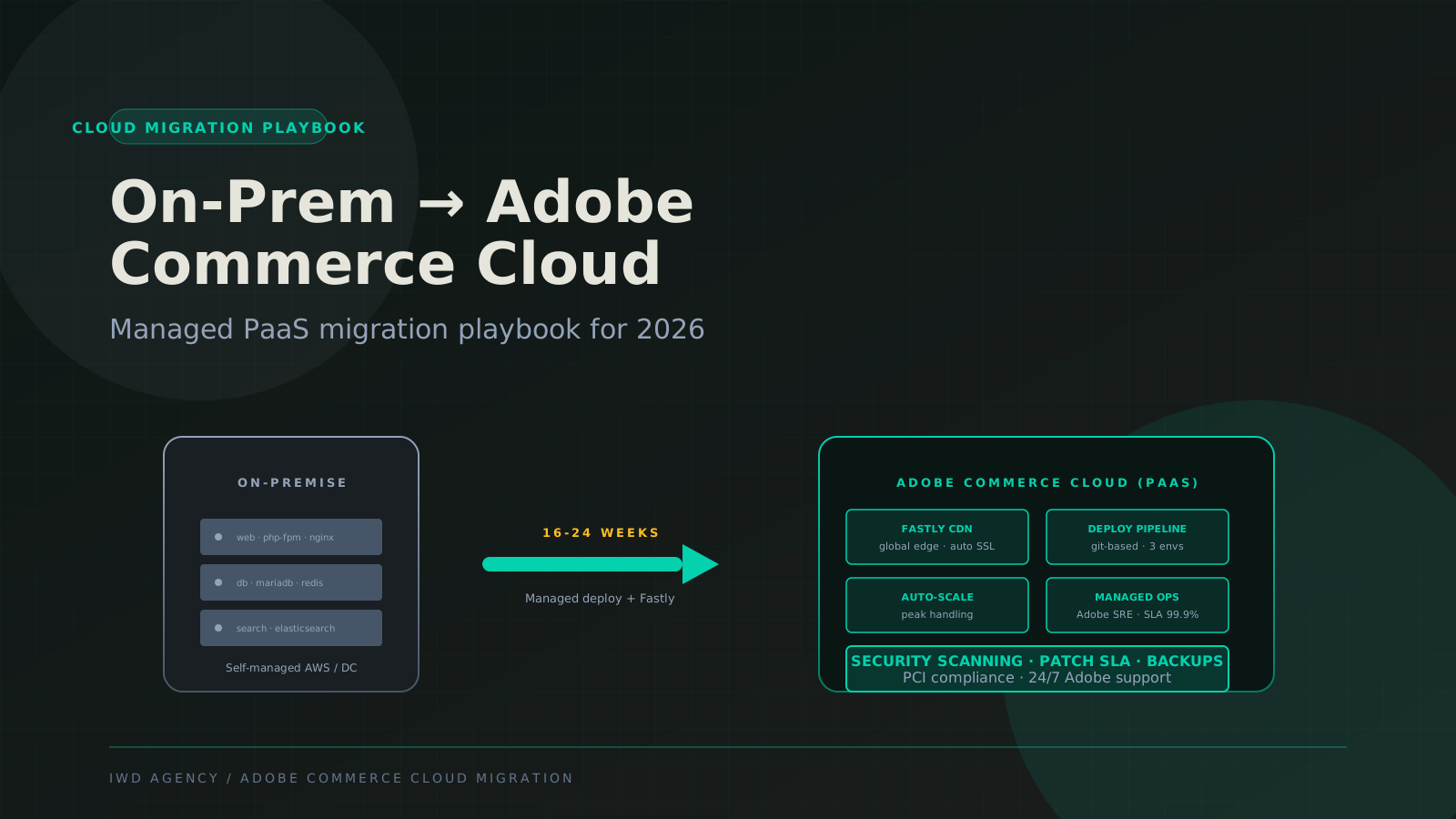
Moving Adobe Commerce from on-premise (self-managed AWS, self-managed Azure, or traditional hosting) to Adobe Commerce Cloud is a real architecture migration. The application code base barely changes, but everything around it does: deploy pipeline, environment model, CDN, monitoring stack, scaling behavior, and operational responsibilities all shift to Adobe's managed PaaS layer.
This guide is the migration playbook our team uses on Adobe Commerce Cloud engagements. It covers when the migration makes sense, the 16 to 24 week deployment timeline, deploy pipeline rebuild, Fastly CDN configuration, environment promotion model, security scanning, monitoring, common pitfalls, and what this actually costs.
The 30-Second Verdict
If you're scanning:
- Migrate to Adobe Commerce Cloud if your DevOps team is lean, you want Adobe-backed SLA, you need a clean deploy pipeline with environment promotion, or you're already on Adobe Commerce license and want managed infrastructure bundled.
- Stay on self-managed if you have a mature DevOps team that can outperform Adobe Cloud on cost and flexibility, you have custom infrastructure requirements that Adobe Cloud doesn't support, or you're on Magento Open Source (Adobe Commerce Cloud requires the Adobe Commerce license).
- Timeline: 16 to 24 weeks for a standard migration. Add 4 to 8 weeks for stores with complex custom infrastructure or B2B Edition.
- Cost: 80K to 250K migration project. Adobe Commerce Cloud annual cost is 40K to 200K (license + managed infra bundled) compared to 22K to 125K for self-managed Adobe Commerce license plus 24K to 96K for self-managed AWS infrastructure.
Should You Migrate at All?
Before committing to the migration, the right first question is whether the move actually fits your team. Adobe Commerce Cloud is a real value upgrade for some shops and overkill for others.
| Dimension | Self-managed (AWS / Azure / DC) | Adobe Commerce Cloud |
|---|---|---|
| Infrastructure ownership | You manage end-to-end | Adobe manages (bundled) |
| Deploy pipeline | You build (CI/CD, Capistrano, etc) | Git-based, Adobe-managed |
| Environment promotion | You build (per-team patterns) | Int → Stage → Prod, baked in |
| CDN | You configure (CloudFront, Cloudflare) | Fastly included, pre-configured |
| Auto-scaling | You configure (more flexible) | Bundled, predictable |
| Security scanning | You implement (Sansec, etc) | Adobe-provided baseline |
| SLA | Your responsibility | Adobe-backed 99.9% |
| Custom infrastructure | Anything AWS supports | Limited (Adobe-defined stack) |
| Annual cost | License (22K-125K) + infra (24K-96K) | Bundled 40K-200K |
| Fits best for | Mature DevOps, custom infra needs | Lean DevOps, prefer vendor SLA |
For the strategic comparison and decision framework, see our Adobe Commerce development guide. This guide assumes you've decided to migrate and need the practical playbook.
The Migration Timeline
Phase 1: Assessment (Weeks 1-3)
Assessment determines what changes between your current infrastructure and Adobe Commerce Cloud. The bigger the delta, the longer Phase 3 will run.
Code base audit
Composer dependencies. Adobe Commerce Cloud uses Composer for code base management with a specific lock file workflow. Review your existing composer.json, identify any private repositories or local references (Cloud requires either packagist-published packages or Adobe Commerce Cloud's private repository support), and confirm all your dependencies are compatible with the Cloud PHP version (7.4 to 8.3 typical in 2026).
Custom modules. Audit app/code/ for custom modules. Cloud requires modules to follow standard Magento conventions (no hardcoded server paths, no environment-specific config in code, no direct database connections outside the framework).
Theme customizations. Custom themes work unchanged on Cloud. The static-content deploy step happens automatically on each Cloud deploy.
Infrastructure stack audit
Document your current infrastructure stack:
- Web tier: nginx / Apache version, PHP-FPM config, number of workers
- Database: MariaDB / MySQL version, primary + replica topology, data volume
- Cache: Redis topology, eviction policy, max memory
- Search: ElasticSearch / OpenSearch version, cluster topology
- CDN: Provider, configured rules, custom VCL (if Fastly)
- Background processing: Cron jobs, RabbitMQ topology, queue consumers
- Storage: Media file storage location (S3, local disk, NFS), volume
- Monitoring: APM (New Relic, Datadog, etc), log aggregation, alerting
- Security: WAF rules, IP allow lists, custom security middleware
What Cloud changes about each
| Component | On-prem | Adobe Commerce Cloud |
|---|---|---|
| Web tier | nginx + PHP-FPM | Adobe-managed nginx + PHP-FPM |
| Database | You manage MariaDB | Adobe-managed MariaDB cluster |
| Cache | Self-managed Redis | Adobe-managed Redis |
| Search | You run ElasticSearch | Adobe-managed OpenSearch |
| CDN | Pick any (CloudFront, etc) | Fastly (included, pre-configured) |
| Media storage | S3 / local disk | Cloud-managed (S3 internally) |
| Cron + queues | You configure | Cloud platform manages |
| Deployment | You build (Capistrano, etc) | Git push to platform |
| Environments | You build (dev/stage/prod) | Integration → Stage → Prod, baked in |
The pattern: things you used to configure, Adobe configures. Things you used to operate, Adobe operates. The trade-off is reduced flexibility for reduced operational burden.
Phase 2: Provisioning (Weeks 3-5)
Cloud provisioning is request-driven. You contact your Adobe account team to provision the project, which gives you three environments (Integration, Stage, Production) on Adobe's AWS infrastructure with Fastly CDN, Adobe-managed PHP/nginx, and the Magento Cloud Docker stack matching production.
Provisioning checklist
- Project provisioning request to Adobe. Provides project size, expected traffic, and B2B requirements.
- Account access. Adobe creates project access for your dev team. Confirm SSH keys are working.
- Initial Git push. Clone the Adobe-provided Cloud repository, push your existing Magento code base to the
integrationbranch. - Initial deploy. Cloud platform builds, deploys, and brings up the Integration environment. First deploy typically takes 30-60 minutes.
- Verify base functionality. Magento Admin loads, frontend renders, sample order flow works.
Environment model
Adobe Commerce Cloud ships three environments by default:
- Integration is the development environment. Git branches map to feature environments within Integration. Multiple developers can work on parallel features without stepping on each other.
- Staging is the pre-production environment. Mirrors Production's infrastructure profile. Used for UAT, load testing, and final validation before cutover.
- Production is the live environment. Receives traffic only after cutover.
Fastly CDN setup
Fastly comes pre-configured on Cloud with a standard VCL ruleset for Magento. Customizations (custom redirects, geo-routing, header manipulation, custom cache rules) move into a .magento/services.yaml config file plus optional custom VCL.
If you're coming from CloudFront or Cloudflare with extensive custom rules, plan time in Phase 2 to translate those rules into Fastly VCL. This is one of the more time-consuming parts of provisioning.
Phase 3: Data Migration and Integration Rewiring (Weeks 5-12)
This is the longest phase. Code moves over via Git relatively easily. The harder work is database migration, media file migration, third-party integration rewiring, and background job translation.
Database migration
Database moves via mysqldump or, for larger catalogs, via Adobe's database migration tooling.
# Export from source
mysqldump --single-transaction --quick \
  --hex-blob --routines --triggers \
  --databases magento > magento-export.sql

# Compress
gzip magento-export.sql

# Import to Cloud Integration env (via SSH tunnel)
magento-cloud ssh -p PROJECT_ID -e integration
# Then load via cloud-shell SSH:
zcat magento-export.sql.gz | magento-cloud db:sql --project=PROJECT_ID
Initial database load happens early in Phase 3. The team then keeps the Cloud database in sync with Production via periodic differential migrations (typically weekly during Phase 3, daily near cutover). The final cutover migration ships only the diff since the last sync.
Media file migration
Customer-uploaded media (product images, swatches, attribute images, page builder images) moves to Cloud's media storage. The typical approach is rsync from on-prem media directory to Cloud's media storage volume via SSH.
# From on-prem server
rsync -avz --progress /var/www/magento/pub/media/ \
  PROJECT_ID@ssh.us.magento.cloud:/app/pub/media/
For very large media libraries (1M+ images), consider phased rsync with delta-only sync nearer cutover, and use the Magento Cloud platform's S3 connector pattern for assets that don't need to be served from /pub/media/.
Third-party integration rewiring
Every third-party integration that points at server endpoints needs to be updated. Common rewiring work:
- Email delivery. On-prem typically uses SES, SendGrid, or Mailgun via direct SMTP config. Cloud has its own outbound mail relay. Reconfigure SMTP settings.
- Webhook endpoints. Any third-party service that pushes webhooks to your Magento (Stripe, PayPal, ShipStation, ERP, CRM) needs the endpoint URL updated to the new Cloud production URL.
- API integrations. ERP, CRM, marketing automation systems that call into Magento via REST or GraphQL need their endpoint URLs updated.
- CDN-level redirects. Any non-Magento redirects you had at CloudFront / Cloudflare level get translated to Fastly VCL or
.magento/services.yaml. - WAF rules. Custom WAF rules (rate limits, IP blocks, geo-blocks) translate to Fastly equivalents or to Adobe's managed WAF layer.
Background job translation
Cron jobs, queue consumers, and scheduled tasks all run on Cloud's platform, but the configuration moves from server-level cron to .magento.app.yaml config. Audit every scheduled task in your current crontab and translate to the Cloud config format.
Background processing for queues happens via Cloud's worker container model. RabbitMQ topology that you previously self-managed becomes Adobe-managed within the project.
Phase 4: Validation (Weeks 12-18)
Validation runs end-to-end against the Staging environment, which mirrors Production's infrastructure profile and Production's data (refreshed weekly from your sync).
Performance validation
Run Lighthouse mobile on top 10 pages, compare against on-prem baseline. Adobe Commerce Cloud with Fastly typically produces flat or slightly improved page-load performance versus self-managed AWS. If you see degradation, the most common causes are: Fastly cache rules not matching your custom CloudFront rules, queue consumer lag introducing slowness on cart operations, or third-party JS that wasn't deferred properly during the migration.
Load testing
Production-realistic load tests against Staging. Use k6, Locust, or JMeter to simulate realistic traffic patterns at 1x and 2x peak volume. Watch for:
- Queue consumer lag under load (Cloud's managed queue should handle, but verify)
- Auto-scaling responsiveness (Cloud auto-scales but may need tuning)
- Database connection pool exhaustion
- Search response time under concurrent queries
- Cart and checkout latency at 2x peak concurrency
Security validation
Run Sansec eComscan and MageReport against Staging. Cloud's bundled security scanning provides a baseline but extra scanning catches edge cases. Verify Cloud's WAF is configured correctly, PCI scanning passes, and Fastly's TLS configuration meets your requirements (TLS 1.2 minimum, ideally 1.3).
Functional UAT
Run your existing automated test suite (Cypress, Playwright, PHPUnit) against Staging. Most tests pass unchanged because the application code is identical. Failures are typically environment-specific (URL hardcoded, server-path assumptions, asset URL changes).
Manual UAT covers the critical buyer journeys, custom features, admin workflows, and for B2B Edition the company account + quote + requisition workflows.
Phase 5: Cutover (Weeks 18-22)
Cutover is a DNS-level swap. Once you're satisfied with Staging validation, you schedule a low-traffic maintenance window, run the final data sync, point DNS at the Cloud production URL, and decommission the old environment after a monitoring period.
Cutover checklist
T-7 days: Final security scan on Staging. Document final cutover procedure with rollback path. Communicate maintenance window to internal teams.
T-3 days: Reduce DNS TTL on your storefront domain to 60 seconds. This shortens the cutover window if you need to roll DNS back.
T-1 day: Final data sync from on-prem to Cloud (database diff + media diff). Final integration test on Staging with production-equivalent data.
Cutover hour:
- Enable maintenance mode on on-prem production
- Run final data sync (typically 10-30 minutes for a near-current diff)
- Verify Cloud production starts cleanly with the migrated data
- Update DNS to point at Cloud production
- Disable maintenance mode on Cloud
- Smoke test critical buyer journeys
- Monitor error rates, conversion, and page load times
T+24 hours: Verify DNS propagation complete. Monitor business metrics for any anomalies.
T+7 days: Decommission on-prem environment. Keep one week of warm standby in case rollback is needed for any reason.
T+30 days: Confirm no SEO regressions in Search Console. Tear down on-prem infrastructure fully.
Rollback path
The rollback path is DNS-only. Revert DNS to the on-prem environment, re-enable on-prem production, and disable Cloud production. The two environments stay in parallel for 7 days specifically so a rollback is straightforward if needed.
The cost of keeping both environments warm for a week is far less than the cost of a botched cutover with no rollback path.
Common Migration Pitfalls
Where Adobe Commerce Cloud migrations get expensive or break
These five issues account for most of the cost overruns and schedule slips we see on Cloud migrations.
Pitfall 1: Underestimating CDN VCL translation. Custom CloudFront or Cloudflare rules need to be translated to Fastly VCL. Teams with extensive custom edge logic underestimate this. Budget 2-4 weeks specifically for VCL translation if you have non-trivial edge rules.
Pitfall 2: Hardcoded server paths in custom code. Custom modules that read /var/www/magento/pub/media/foo directly break on Cloud because Cloud's filesystem paths differ. Audit Phase 1 has to catch every absolute path reference in custom code.
Pitfall 3: Outbound email surprises. Cloud's outbound mail relay has rate limits and IP reputation that may differ from your previous SMTP provider. Test transactional email delivery rate and inbox placement on Staging before cutover.
Pitfall 4: Background job timing changes. Cron and queue consumer timing on Cloud differs from self-managed cron. Jobs that ran at very specific times (3:07am daily) may run on slightly different schedules. Audit any business processes that depend on exact job timing.
Pitfall 5: Third-party services hitting old IP addresses. Webhook senders that hardcoded the on-prem IP address (instead of using DNS) will keep hitting the old environment after DNS cutover. Audit webhook senders before cutover and force them to update.
What This Actually Costs
Migration project cost (one-time):
- Standard migration, 10-30 third-party modules, no B2B: 80K to 130K, 16 to 20 weeks
- Mid-complexity, 30-50 modules, B2B Edition, custom integrations: 130K to 200K, 18 to 24 weeks
- Complex, 50+ modules, heavy custom workflows, custom checkout, deep ERP integration: 200K to 350K, 22 to 30 weeks
Adobe Commerce Cloud annual cost (recurring):
- Starter tier (up to ~3M GMV): 40K to 60K annual
- Mid-tier (3M to 25M GMV): 60K to 120K annual
- Enterprise tier (25M+ GMV): 120K to 250K+ annual
Compare against self-managed: License (22K-125K) + AWS infrastructure (24K-96K) = roughly 46K to 220K annual for self-managed Adobe Commerce. The Cloud bundle is often comparable or slightly higher in dollars, but with Adobe operating the infrastructure.
Frequently Asked Questions
Common questions about Adobe Commerce Cloud migration
How long does an Adobe Commerce Cloud migration take?
Standard: 16 to 22 weeks. Mid-complexity with B2B Edition: 18 to 26 weeks. Complex with heavy integrations: 22 to 30 weeks. The provisioning + assessment phases (Phase 1-2, ~5 weeks) are fairly fixed. The build phases (3-4) scale with infrastructure complexity.
Will Cloud cost more than self-managed AWS?
Usually slightly more in dollars, but less in total operational effort. Self-managed AWS costs less for infrastructure (24K-96K annual) but you carry the operational responsibility for hosting, patching, scaling, security scanning, and SLA. Cloud bundles all of that with vendor SLA. The decision is rarely about pure dollars.
Do we keep our existing custom modules?
Yes. Cloud runs Adobe Commerce code unchanged. Custom modules work as long as they don't make on-prem-specific assumptions (hardcoded paths, direct filesystem writes outside the framework, custom OS-level dependencies).
What's the SLA from Adobe Commerce Cloud?
99.9% uptime SLA with Adobe-backed managed operations. Adobe handles infrastructure failover, scaling, patching of the underlying platform. Application-level issues (your custom code, your database queries) are still your responsibility but Adobe support helps diagnose.
Can we still use third-party Fastly customizations on Cloud?
Yes, via custom VCL snippets. Cloud ships Fastly with a standard VCL configuration. Custom rules go into per-environment VCL snippets via the .magento/services.yaml configuration. Extensive custom VCL works but requires familiarity with Fastly's VCL syntax.
What happens to our SEO during cutover?
Should stay flat. URL structure, canonical tags, structured data, meta tags, and sitemap don't change because the application is identical. The DNS cutover transfers traffic to a new IP, but Google handles that within hours. Monitor Search Console for 30 days post-cutover for any anomalies. The most common SEO issue we see is forgotten 301 redirects from old CDN-level rules; audit those before cutover.
Should we do Hyva migration at the same time as Cloud migration?
Not recommended. Sequence them: Cloud migration first, then Hyva. Doing both simultaneously creates too many variables when something breaks. Hyva on the new Cloud environment is the right order.
Can we go back to self-managed after migrating to Cloud?
Technically yes, practically rarely. The application code and database are portable. The Cloud-specific configurations (.magento.app.yaml, environment variables, Fastly VCL) would need to be re-implemented on your destination infrastructure. We've not seen a single client choose to migrate back after going to Cloud, but it's an architectural option.
Decision Framework
Is Adobe Commerce Cloud the right next move?
DevOps team is 0-2 people, no dedicated platform engineer
Migrate to Cloud. Bundled managed operations save more than the price delta. Adobe-backed SLA gives you a phone number to call when things go wrong.
DevOps team is 5+ with strong AWS or platform engineering capability
Self-managed wins on flexibility and often cost. Your team can outperform Adobe Cloud on most operational dimensions and customize infrastructure for your specific workload.
High-velocity flash sale or drop business, frequent traffic spikes
Cloud's auto-scaling helps. Spike handling is bundled. Self-managed AWS can match but requires investment in auto-scaling and pre-warm patterns.
Heavy custom infrastructure (custom Redis topology, custom search, exotic queue patterns)
Self-managed retains flexibility. Cloud's managed stack is opinionated. If your operations require non-standard infrastructure, self-managed gives you more options.
Need to demonstrate enterprise security posture for compliance (SOC 2, PCI)
Cloud provides better documentation out of the box. Adobe's managed compliance scanning, patch SLA, and security operations give you audit-ready documentation. Self-managed requires you to produce the same documentation independently.
Related Reading
Adobe Commerce Cloud services · Adobe Commerce development services · Adobe Commerce development guide · Magento development services · Magento security patching playbook · Magento NetSuite integration guide
If you're scoping a migration from self-managed Adobe Commerce or Magento to Adobe Commerce Cloud, book a 30-minute migration assessment with our Adobe Commerce team. We'll review your current infrastructure stack, identify Cloud compatibility considerations, and provide a realistic timeline and cost estimate.
Work with IWD
IWD runs Adobe Commerce migrations and performance work. Explore our Adobe Commerce speed optimization, Adobe Commerce migration, and ecommerce replatforming.