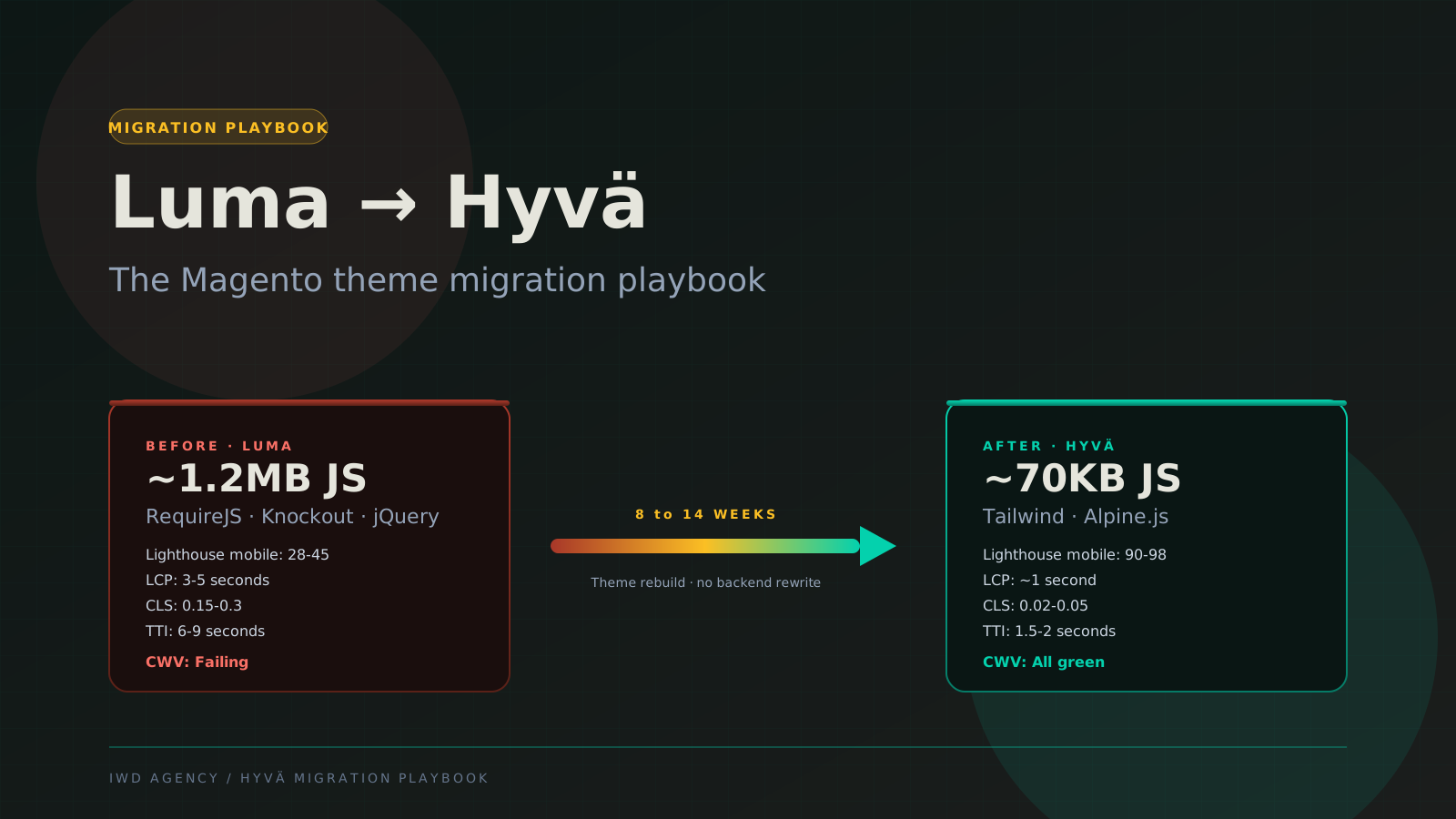
Luma to Hyva is the single highest-leverage performance investment most Adobe Commerce stores can make in 2026. Sub-1-second LCP, 90+ Lighthouse mobile scores, and 92 percent reduction in JavaScript payload, with no backend rebuild required. The catch is that the migration isn't trivial. Module compatibility, custom theme code, third-party integrations, and visual regression all need to be planned for.
This guide is the migration playbook our team uses on Luma-to-Hyva engagements. It covers the audit phase, module compatibility mapping, the theme rebuild approach, QA process, and cutover playbook. Read this alongside our Hyva vs Luma comparison for the strategic decision framework before committing.
The 30-Second Verdict
If you're scanning:
- Timeline: 8 to 14 weeks for a standard catalog. Add 2 to 4 weeks for stores with heavy customization, B2B Edition, or 50+ third-party modules.
- Cost: 35K to 95K depending on complexity. Compares to 90K to 200K for a full headless rebuild.
- Outcome: 30-50% LCP reduction, 90+ Lighthouse mobile, ~92% JavaScript bundle reduction, Core Web Vitals all green.
- Biggest risk: Module compatibility. Most popular modules have Hyva compatibility packages now, but custom modules and obscure third-party modules may need bridge work.
Why Migrate in the First Place
The Luma theme architecture is a 2013-era pattern that hasn't aged well. RequireJS for module loading, Knockout.js for client-side templating, jQuery for everything else, and Less for CSS. The result on a stock Adobe Commerce build: ~1.2MB of JavaScript shipped to the browser, 3-5 second LCP on competitive PDPs, and Lighthouse mobile scores in the 28-45 range. Core Web Vitals fail on most pages.
Hyva replaces that entire frontend stack. Tailwind CSS plus Alpine.js plus a tiny bit of vanilla JavaScript. The Magento backend stays untouched. The theme layer changes. Result: ~70KB JavaScript, sub-1-second LCP, 90+ Lighthouse mobile scores, Core Web Vitals all green.
For the strategic case (when Hyva wins, when headless wins, when Luma stays), see our Hyva vs Luma comparison. This guide assumes you've decided to migrate and need the practical playbook.
The 5-Phase Migration Playbook
Phase 1: Audit (Weeks 1-2)
The audit is the most important phase. A clean audit prevents 80 percent of the surprises that derail migrations during build. Skip or rush this, and the project schedule slips.
What to inventory
Third-party modules. Run bin/magento module:status and composer show | grep -v "magento\|laminas\|symfony" to list everything installed. For each non-core module, document: vendor name, version, what it does, whether it has frontend rendering (theme dependencies), and whether the vendor offers a Hyva compatibility module.
Custom modules. Anything in app/code/ not from a vendor is custom. For each one, document: what it does, whether it touches the frontend (phtml templates, layout XML, JS, CSS), and whether the original developer is still available to support changes.
Theme code. Custom Luma child themes contain phtml overrides, CSS overrides, JS customizations, and image assets. The audit should cover every file in app/design/frontend/<vendor>/<theme>/. Document each customization with its purpose and visual impact.
Third-party JS integrations. Live chat widgets, analytics tracking (GTM, GA4, Hotjar, Microsoft Clarity), reviews (Yotpo, Stamped, Trustpilot), subscription tools (ReCharge, Bold), checkout integrations (PayPal Express, Klarna, Affirm), search (Algolia, Klevu), and personalization. Most of these work fine with Hyva but need re-integration in the new theme layer.
B2B Edition features. If you're on Adobe Commerce B2B Edition, separately audit company account UI, quote workflow, requisition list rendering, custom catalog visibility, and the customer dashboard. These have specific Hyva compatibility considerations.
What to capture for the build phase
Output of Phase 1 is a structured audit document containing the module compatibility list (next phase consumes it), a visual reference library (screenshots of every important page state), the third-party JS inventory with re-integration plan, and a list of custom theme features that need to be rebuilt in Hyva.
The migration scope document
Output of the audit phase is a migration scope document covering: module inventory, custom code inventory, theme customization inventory, third-party integration list, B2B feature list, visual reference library, and risk register. The build phase scope is locked from this document. Mid-build scope changes are where Hyva migrations get expensive.
Phase 2: Module Compatibility Mapping (Weeks 2-3)
Every Magento module either has a Hyva compatibility module shipped by the vendor, has a community-built compatibility module on Hyva Themes' GitHub, needs custom bridge work, or needs to be replaced or removed. This phase decides which bucket each module falls into.
How to check for Hyva compatibility
For each third-party module in your inventory:
- Search the vendor's website or GitHub for "Hyva" or "compatibility module"
- Search the Hyva Themes organization on GitHub (
hyva-themes/) for a community-built compatibility module - Check the Hyva module compatibility tracker maintained by Integer Net at
https://hyva-themes.github.io/hyva-compatibility-modules/ - If still not found, search PHP Composer at packagist.org for
hyva-themes/magento2-<vendor>-<module>
For modules without Hyva compatibility, the question becomes: build a bridge, replace the module, or remove it. The bridge build effort depends on how much of the module touches the frontend.
Common modules that already have Hyva compatibility
Most of the popular Magento module vendors ship Hyva compatibility in 2026: Amasty, Mageplaza, Aheadworks, Mirasvit, Yotpo, Stamped, Algolia, Klevu, Klaviyo, GTM, Bold, ReCharge, PayPal, Stripe, Klarna, Affirm, Trustpilot, and most search and personalization vendors. Check the latest list before assuming any specific module is covered.
Phase 3: Theme Rebuild (Weeks 3-9)
This is the longest phase because it's where custom theme code from Luma gets rewritten as Tailwind + Alpine. The Hyva base theme provides a clean starting point. Custom design decisions, layout overrides, and storefront-specific logic come over manually.
Install the Hyva base theme
Hyva ships as a Composer package. Install it on a feature branch off your current code base:
composer require hyva-themes/magento2-default-theme
bin/magento setup:upgrade
bin/magento cache:flush
bin/magento setup:static-content:deploy -f
After install, you have the base Hyva theme available. Don't activate it in production yet. Activate it in your local and staging environments only.
Install compatibility modules
For every third-party module that has Hyva compatibility (vendor-shipped or community-built), install it next:
composer require hyva-themes/magento2-amasty-blog
composer require hyva-themes/magento2-mageplaza-blog
# etc, one line per compatibility module
bin/magento setup:upgrade
bin/magento cache:flush
Rebuild custom theme code
This is where the time goes. Your custom Luma child theme contains phtml overrides, layout XML, custom CSS, custom JavaScript, and custom block classes. Hyva uses a different rendering model (Tailwind classes inline, Alpine.js for interactivity), so each customization gets rewritten.
The typical pattern is:
- Take a screenshot of the Luma rendering of each customized page state
- Identify the Hyva equivalent file path (typically
app/design/frontend/<vendor>/<theme>/Hyva_Theme/templates/...) - Rewrite the Hyva phtml with Tailwind utility classes for styling and Alpine.js for any interactivity
- Compare side-by-side against the Luma screenshot
- Adjust for visual parity
Visual parity is the goal, not pixel-perfect identical. Sometimes Hyva's cleaner default rendering is preferable to your old Luma styling, and you adopt the Hyva approach. Sometimes brand requirements demand exact matching, and you tune Tailwind to hit it.
Common customizations and how they translate
| Luma pattern | Hyva equivalent | Effort |
|---|---|---|
| Custom phtml template | Rewrite as Hyva phtml with Tailwind | 1-3 hours each |
| Custom Less file | Tailwind utility classes inline | Replaces Less entirely |
| RequireJS module | Alpine.js component or vanilla JS | 2-6 hours each |
| Knockout-bound component | Alpine.js x-data + x-bind | 2-8 hours each |
| Layout XML override | Same XML syntax, different blocks | Often near-direct port |
| Custom block class (PHP) | Block PHP unchanged, template rewrites | PHP layer untouched |
Re-integrate third-party JavaScript
Analytics, chat, reviews, and personalization scripts mostly work without modification (they're typically <script> tags injected via layout XML or Page Builder). Verify each one fires correctly in Hyva. The handful that integrate deeply with the cart or checkout (subscription apps, dynamic pricing) may need custom bridge work via the Magento ViewModel pattern.
Phase 4: QA and UAT (Weeks 9-12)
QA on a Hyva migration breaks into three streams: visual regression, functional testing, and performance validation.
Visual regression testing
Tools like Percy, BackstopJS, or Chromatic compare screenshots of every important page state between the Luma production site and the Hyva staging site. Differences are flagged for review. Most are intentional (you're moving to Hyva styling) but unintentional regressions surface here.
Coverage minimum: homepage, top 5 category pages, top 10 PDPs (one per product type if you have configurable, downloadable, virtual, bundle, simple), cart, checkout each step, customer login, customer dashboard, customer order history, and any custom storefront pages.
For B2B stores add: company account dashboard, quote workflow each step, requisition list, custom catalog category page, and the customer-group-specific PDP pricing display.
Functional end-to-end testing
Run your existing Cypress, Playwright, or PHPUnit functional test suite against the Hyva staging environment. Most tests pass unchanged because the backend is identical. UI selectors may need updating (Hyva uses different CSS class names than Luma) but the test logic transfers.
Cover the critical buyer journeys: search products, add to cart, checkout with each payment method, customer registration, customer login, account dashboard, order history, and for B2B the quote workflow + requisition list + company admin workflow.
Performance validation
Run Lighthouse mobile against your top 10 most-visited pages. Compare Hyva staging scores to Luma production. Expected outcomes:
- Lighthouse mobile: 28-45 (Luma) → 90-98 (Hyva)
- LCP: 3-5s (Luma) → ~1s (Hyva)
- CLS: 0.15-0.3 (Luma) → 0.02-0.05 (Hyva)
- Total JS: ~1.2MB (Luma) → ~70KB (Hyva)
- Total CSS: ~250KB (Luma) → ~50KB (Hyva)
If your Hyva staging build doesn't hit these numbers, investigate before cutover. Common causes: heavy third-party JS not deferred properly, large hero images not optimized, or compatibility modules shipping unused JavaScript.
Phase 5: Cutover (Weeks 12-14)
The cutover is the lowest-risk phase because no backend changes are happening. You're switching theme. The complexity is operational, not technical.
Phased rollout via CDN traffic split
Most CDNs (Fastly, CloudFront, Cloudflare) support traffic splitting. Configure 10 percent of traffic to the Hyva theme for 24 hours, then 50 percent for 48 hours, then 100 percent. This gives you real-traffic validation at each step without committing the entire customer base.
Alternative on Adobe Commerce Cloud: use Cloud's blue-green deployment model with the Hyva theme on the green environment and Luma on blue, switching traffic at Fastly.
Monitor what matters
For the first 72 hours post-cutover, monitor conversion rate against the baseline (compare same-day-of-week, weather-adjusted if you have seasonal patterns), cart abandonment rate, JavaScript error rate (Sentry, LogRocket, or similar), Lighthouse mobile scores on top 10 pages, search position trends in GSC, and customer support volume.
Rollback triggers
Predefined rollback triggers: conversion rate down more than 15 percent versus baseline for more than 6 hours, cart abandonment rate up more than 10 percentage points, JavaScript error rate up more than 5x. Any of these triggers an immediate rollback to Luma. The rollback path is simple: switch the active theme back at the Magento level (or revert the CDN traffic split if you're still in phased rollout).
Search position drops on key terms are also a rollback signal, but they tend to lag the cutover by 1-2 weeks. Monitor for 30 days post-cutover.
SEO cutover validation
Hyva preserves URL structure, canonical tags, structured data, meta tags, and sitemap structure by default. The migration shouldn't affect SEO if executed correctly. Validate after cutover:
- Spot-check URL structure on top 20 pages (no URL changes)
- Verify canonical tags on all major page types
- Verify Product, BreadcrumbList, Organization, and FAQ JSON-LD render in the page source
- Verify Open Graph and Twitter Card meta tags render
- Re-submit the XML sitemap to Google Search Console
- Watch for crawl errors in GSC for the first 14 days
Common Migration Pitfalls
Where Luma to Hyva migrations get expensive or break
These five issues account for the majority of the cost overruns and schedule slips we see on Hyva migrations.
Pitfall 1: Underestimating custom theme code. Teams scope based on third-party module count but forget about their custom theme overrides. A 50-line phtml override may take a day to rewrite in Hyva when you account for matching the visual output. Audit phase has to include custom code, not just modules.
Pitfall 2: Skipping the staging mirror. A staging environment that doesn't mirror production (different module versions, different data sample, different infrastructure) catches fewer issues. Allocate budget for a properly-mirrored staging environment.
Pitfall 3: Doing Hyva and a redesign at the same time. Don't combine migration with a brand refresh. Migrate first (visual parity with current Luma styling), then ship the redesign as a separate project. Combining them makes everything harder to debug because every visual difference could be migration regression or intentional redesign.
Pitfall 4: Forgetting B2B-specific UI. B2B Edition features (company account dashboard, quote workflow, requisition list, custom catalog) need separate compatibility validation. They're often not in the default visual regression test scope but are critical to B2B operations.
Pitfall 5: No rollback plan. Cutovers without documented rollback procedures are how 6-hour issues become 3-day disasters. Write the rollback procedure during the build phase, not at 2am when something breaks.
What This Actually Costs
Standard catalog, 10-30 third-party modules, light custom theme code: 35K to 60K, 8 to 12 weeks.
Mid-complexity catalog, 30-50 modules, B2B Edition, moderate custom code: 60K to 95K, 12 to 16 weeks.
Complex catalog, 50+ modules, heavy B2B + custom workflows, custom checkout: 95K to 150K, 14 to 20 weeks.
Compare these against a full headless rebuild at 90K to 200K, 16 to 24 weeks. Hyva delivers most of the performance benefit at a fraction of the cost and timeline.
Frequently Asked Questions
Common questions about Luma to Hyva migration
How long does a Luma to Hyva migration take?
Standard catalog: 8 to 14 weeks. Mid-complexity with B2B Edition: 12 to 16 weeks. Complex stores with heavy custom code: 14 to 20 weeks. The audit phase predicts the build phase length, so a good Phase 1 keeps the schedule honest.
What's the Lighthouse score improvement after migration?
Typical: 28-45 (Luma) → 90-98 (Hyva) on mobile. LCP drops from 3-5s to ~1s. CLS drops from 0.15-0.3 to 0.02-0.05. JavaScript payload drops from ~1.2MB to ~70KB. Core Web Vitals go from failing to all green on most pages.
Do we lose any Magento functionality with Hyva?
No. Hyva is a theme layer, not a backend replacement. All Magento and Adobe Commerce functionality continues to work. The only thing that changes is the frontend rendering technology (Tailwind + Alpine instead of RequireJS + Knockout).
What if a critical third-party module doesn't have Hyva compatibility?
Three options: (1) Build a custom Hyva bridge for it (1-3 days typical), (2) Find a substitute module that does have Hyva compatibility, (3) Remove the module if it's not essential. Most popular modules already have compatibility in 2026. The risk is concentrated in niche or abandoned modules.
Can we run Luma and Hyva in parallel during cutover?
Yes, via CDN traffic split. Configure Fastly, CloudFront, or Cloudflare to send a percentage of traffic to the Hyva-themed store and the rest to Luma. Scale up the Hyva percentage as confidence builds. Most teams move 10% → 50% → 100% over 72 hours.
Will Hyva affect our SEO?
Positively, in most cases. Hyva preserves URL structure, canonical tags, structured data, meta tags, and the XML sitemap. The performance gains (LCP, CLS, mobile UX) are positive ranking signals. We've seen SEO stay flat or improve in every Hyva migration we've shipped. Drops have been the rare exception traceable to specific theme code regressions, caught and fixed within 30 days.
Does Hyva work with Adobe Commerce B2B Edition?
Yes, with B2B compatibility modules. The community-maintained hyva-themes/magento2-b2b package covers the standard B2B Edition UI components (company accounts, buyer hierarchy, quote workflow, requisition list, custom catalogs). Custom B2B workflows on top of those may need additional bridge work depending on what your team built.
Should we migrate now or wait?
Migrate now if: your Lighthouse mobile is under 60, your LCP is over 2.5s, you're losing rankings on competitive PDPs, you're rebuilding the storefront for any reason anyway. Wait if: you're on Magento Open Source 2.3 (upgrade to 2.4 first), you have a major release in flight (don't combine), you have a brand redesign planned in the next 90 days (do them sequentially, migration first).
Decision Framework
Is Luma to Hyva the right next move?
Lighthouse mobile is under 60, LCP over 2.5s
Migrate. Highest-impact single investment available. Sub-1-second LCP outcome with no backend rewrite. 8 to 14 weeks. Returns measurable in conversion rate within 30 days.
Lighthouse mobile is 60-80, considering headless rebuild
Hyva first, headless later (or not at all). Hyva will close most of the performance gap at 30-50% of the cost. Reassess the headless case after Hyva is live.
Lighthouse mobile is already 80+ on Luma
Migration ROI is weaker but still positive. Hyva will push you to 90+, future-proof the frontend stack, and make ongoing development cheaper. Schedule it but not as an emergency.
On Magento Open Source 2.3 or older
Upgrade to 2.4 LTS first. Hyva requires Magento 2.4+. The upgrade and the migration can be sequenced or combined depending on your team's capacity.
Related Reading
Hyva theme development services · Hyva vs Luma comparison · Adobe Commerce development guide · Magento development services · Adobe Commerce development · Magento security patching playbook
If you're scoping a Luma to Hyva migration for 2026, book a 30-minute migration scoping call with our Magento team. We'll review your module inventory, audit custom theme code, and provide a realistic timeline and cost estimate.