A brand group grows one acquisition at a time, and each brand usually arrives with its own website. A few years later, the group runs four storefronts on three platforms, with four sets of integrations, four agencies, four checkout experiences and a finance team stitching the numbers together by hand. The brands are supposed to share a warehouse, an ERP and a customer service team. The websites don't.
Multi-brand ecommerce fixes that by running several brand storefronts on one platform: one back end, a shared catalog and integrations, and a distinct storefront for each brand. This guide covers what to share, what to keep separate, how the main platforms handle it, and when a single platform is the wrong answer.
Why brand groups consolidate
One set of integrations. Every storefront needs the ERP, inventory, tax, payments, shipping, email and reviews connected. On separate platforms, each integration is built, maintained and fixed several times. On one platform, it is built once.
One view of inventory and orders. When brands share a warehouse, separate stores oversell shared stock or lock it into brand silos. A shared back end gives every storefront the same live inventory and sends every order into one fulfillment flow.
Faster launches. Once the platform, checkout and component library exist, launching a new brand or a regional store is mostly a theme and content project, not a new build.
Lower total cost. Fewer licenses and hosting plans, one development team that knows the code base, and fixes and improvements that ship to every brand at once.
What to share and what to keep separate
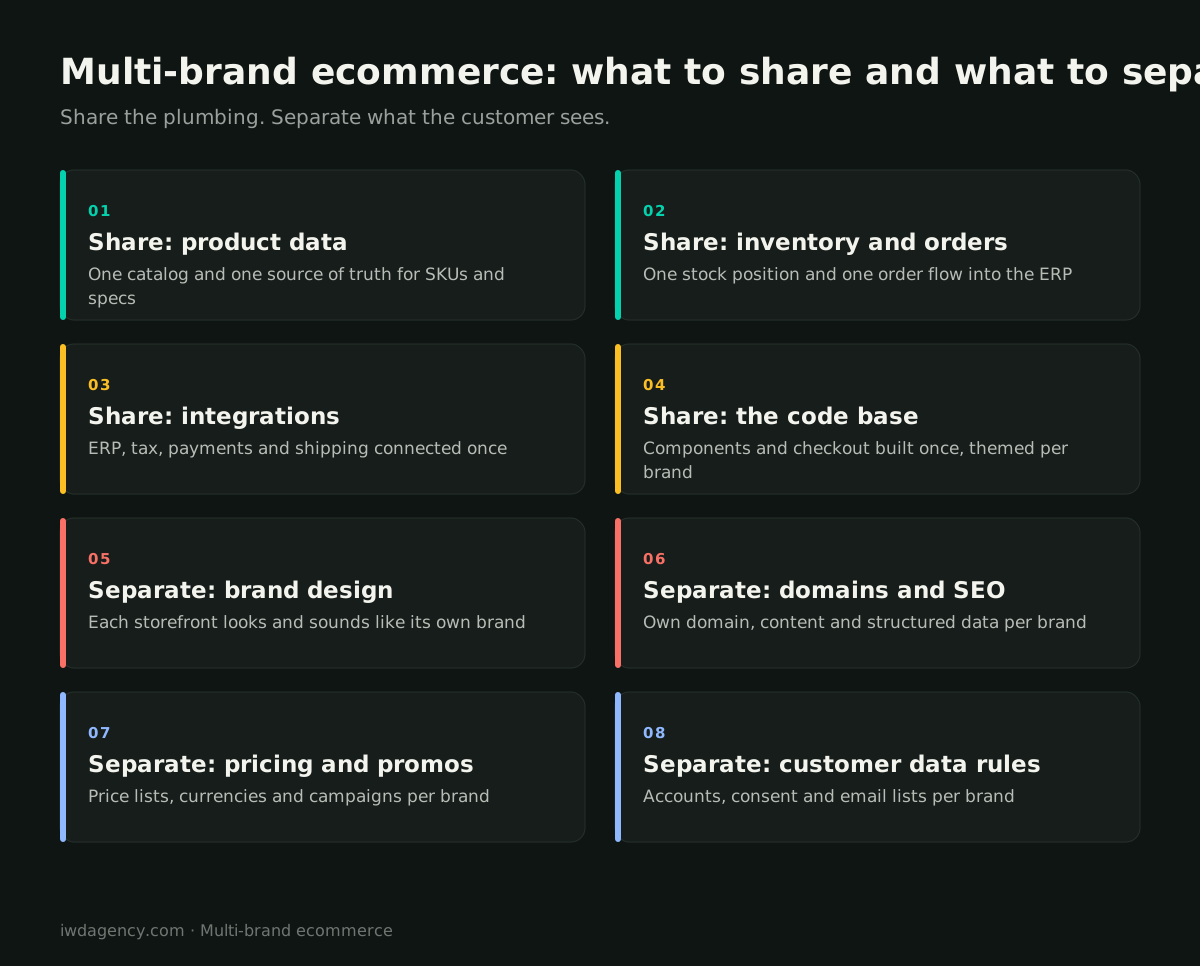
The rule of thumb: share the plumbing, separate what the customer sees.
Share
- Product data: one catalog as the source of truth for SKUs, specs and media, with each product assigned to the brands that sell it.
- Inventory and order management: one stock position and one order flow into the ERP and warehouse.
- Integrations: ERP, tax, payment gateway, shipping, PIM and analytics connected once.
- Code and components: a shared component library and checkout, themed per brand, so improvements reach every storefront.
Keep separate
- Brand design and voice: each storefront should look and sound like its own brand. Customers should never feel they are on a generic group site.
- Domains and SEO: each brand keeps its own domain, URLs, content, metadata and structured data. Consolidating platforms should never mean consolidating brands into one domain unless that is a deliberate brand decision.
- Pricing and promotions: price lists, currencies, promotions and loyalty rules per brand.
- Customer data rules: accounts, marketing consent and email lists per brand, in line with each brand's privacy policy.
How the major platforms handle multiple stores
Adobe Commerce and Magento
Adobe Commerce and Magento Open Source have multi-store built into the core: one installation can run multiple websites, each with its own stores and store views, domains, themes, catalogs, prices and currencies, all from a single admin and a single database. It is the most flexible option for groups with overlapping catalogs, shared inventory and B2B and DTC brands side by side. As an Adobe Commerce agency and Magento agency, this is the setup we most often recommend for groups with complex catalogs or heavy integrations.
Shopify Plus
Shopify Plus runs each brand as its own store within an organization, with centralized admin, user management and apps that can work across stores. Each store has its own catalog and inventory settings, so shared product data and stock typically come from the ERP or a PIM that syncs to every store. It is a strong fit when brands are more independent and each wants Shopify's speed of launch. Our Shopify Plus agency team builds this setup.
BigCommerce
BigCommerce Multi-Storefront lets one BigCommerce store power several storefronts with different domains, themes and catalogs, sharing one back end and inventory. It sits between the other two: more shared than separate Shopify stores, simpler than a full Adobe Commerce multi-site. Our comparison of Shopify Markets vs BigCommerce Multi-Storefront covers the details, and our BigCommerce agency team builds on it.
When one platform is the wrong answer
Consolidation isn't always right. Keep brands separate when:
- They have almost no overlapping products, suppliers or fulfillment.
- One brand is being prepared for sale and needs to be easy to separate.
- A brand has requirements the shared platform can't meet without compromising the others.
- The brands have very different teams and budgets, and no appetite for shared governance.
In those cases, shared integrations through middleware or an ERP can still deliver most of the operational benefit without forcing the storefronts together.
A real example
When Europa Eyewear replatformed onto Shopify Plus, three brands and more than 3,500 products moved onto one stack, with the ERP integration designed so a future ERP change would only mean swapping the connector.
How to plan a multi-brand consolidation
- Map what each brand really shares. Products, suppliers, warehouses, customers, pricing rules and teams. The overlap decides the architecture.
- Pick the platform for the hardest brand. The brand with the most complex catalog, B2B requirements or integrations usually determines which platform fits.
- Design one component library. Build a design system that each brand can theme, so shared improvements don't flatten brand identity.
- Migrate one brand first. Launch the most straightforward brand, stabilize the shared back end, then bring the others across in waves.
- Protect each brand's SEO. Every migration needs its own redirect map and a year-one review. Our ecommerce migration checklist covers what to check after each launch.
Running several brands on separate sites?
Book a free 30-minute assessment. We'll map what your brands share, what they don't, and whether a single platform would lower your costs and speed up launches. No pitch deck, no obligation.
Book a 30-minute assessmentMore guides for growing ecommerce teams
- Ecommerce migration checklist: your first year after a replatform
- B2B ordering portals: what contractors and retailers expect
- Ecommerce for lab and reagent suppliers, including punchout catalogs
- Selling technical and regulated gear online
- CRO for considered, higher-priced purchases
- Is your ecommerce platform holding you back? A 10-minute self-check
Frequently asked questions
What is multi-brand ecommerce?
Multi-brand ecommerce means running several brand storefronts from one ecommerce platform, with a shared back end, catalog and integrations, and a distinct design, domain and content for each brand.
Can you run multiple Shopify stores from one account?
On Shopify Plus, multiple stores can sit within one organization with centralized admin, users and some apps. Each store still has its own catalog and inventory settings, so groups usually sync shared product data and stock from an ERP or PIM.
Does running brands on one platform hurt their SEO?
Not if each brand keeps its own domain, URLs, content and metadata, and each migration has a proper redirect plan. A shared platform is invisible to search engines when each storefront is set up as its own site.
Which platform is best for multiple brands?
Adobe Commerce and Magento offer the most flexible native multi-site setup for overlapping catalogs and shared inventory. BigCommerce Multi-Storefront suits groups that want shared operations with less complexity. Shopify Plus works well when brands are more independent.
How long does it take to consolidate brand stores?
It depends on the number of brands, catalog size and integrations. Most groups launch the platform with one brand first, then migrate the others in waves, which spreads the risk and lets the shared back end stabilize.