A contractor standing in a half-finished kitchen does not want to call your inside sales team, wait on hold, and read part numbers off a crumpled list. A retail buyer reordering 40 SKUs for three locations does not want to email a spreadsheet and wait a day for a confirmation. Both of them already order everything else in their lives online. A B2B customer portal is how you meet them there, and in 2027 the bar is higher than "we have a login page."
This guide covers what distributors, wholesalers and manufacturers need to get right in a B2B ordering portal, the ten features buyers now treat as standard, and how to roll it out without upsetting the accounts that pay the bills. It comes from the portals our B2B ecommerce development team has built for distributors, OEMs and suppliers across Magento, Adobe Commerce, Shopify Plus and BigCommerce.
Why buyers switch to the supplier that is easiest to order from
In most distribution categories, several suppliers can deliver the same product at a similar price. What separates them is how much effort it takes to buy. When one supplier lets a buyer check stock, see their price and reorder in two minutes, and another needs a phone call and a callback, the easy one wins the reorder, and over time the account.
A good portal also changes the economics on your side. Routine reorders move online, so your sales and customer service teams spend their time on new accounts, large quotes and problems that need a person. Order errors from retyped emails and faxes drop, because the buyer enters the order against your live catalog.
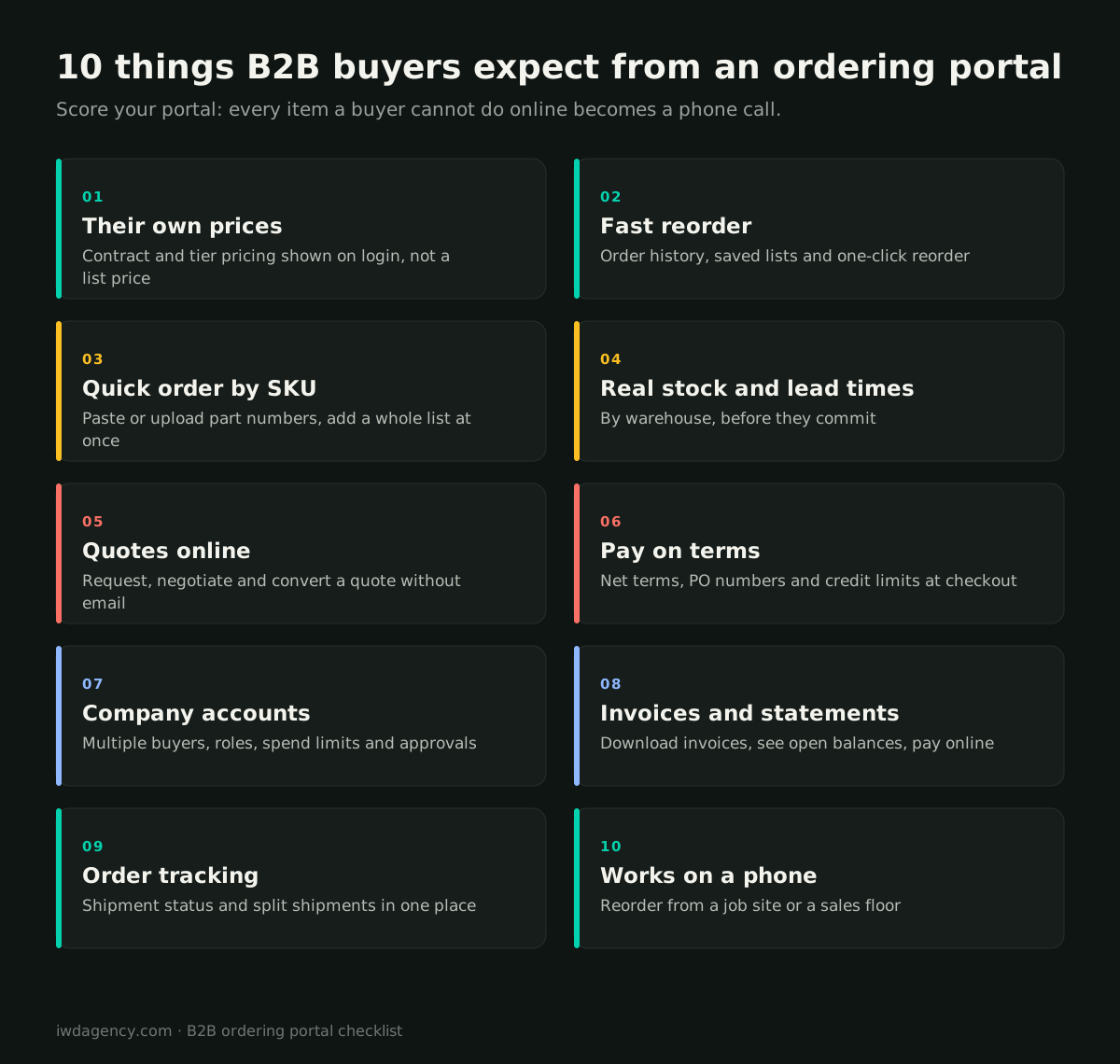
The 10 features B2B buyers expect from an ordering portal
1. Their own prices, the moment they log in
Nothing erodes trust faster than a list price on screen and a different price on the invoice. Buyers expect to see their contract pricing, tier or volume breaks and any customer-specific catalog as soon as they sign in. That means your pricing logic, usually in the ERP, has to be the source of truth for the storefront, not a copy someone updates by hand.
2. Fast reorder from history and saved lists
Most B2B orders are repeat orders. Buyers want their order history, saved lists for each job or location, and a one-click "reorder" that respects today's pricing and stock. For contractors, lists per project are especially useful: the same fixtures and consumables get ordered job after job.
3. Quick order by SKU or upload
Experienced buyers know your part numbers better than your navigation. Give them a quick-order form where they can type or paste SKUs with quantities, or upload a CSV, and add a full order in one step. This single feature often moves more volume online than the rest of the site combined.
4. Real stock and lead times
"In stock" is not enough when a buyer is scheduling a crew or a delivery. Show availability by warehouse or branch, expected lead times for backordered items, and the cutoff for same-day shipping. If you have multiple ship-from locations, let the buyer see what arrives when.
5. Quotes online
Large orders, project pricing and special items still need a quote. The portal should let a buyer request one against the products in their cart, let your team adjust prices and terms, and let the buyer accept and convert it to an order without a single email attachment. On one Hyva and Adobe Commerce B2B build for School Fix, a custom quote engine became a core part of how buyers purchase.
6. Pay on terms at checkout
Business buyers pay on account. Checkout needs to support net terms, purchase order numbers, credit limits and tax-exempt status, not just credit cards. Credit terms built into checkout were a key requirement on the Adobe Commerce B2B platform we run for DMC, alongside real-time ERP sync.
7. Company accounts, roles and approvals
A single login shared across a company is a security and accountability problem. Buyers expect company accounts with multiple users, roles (purchaser, approver, finance), spending limits and approval workflows for orders above a threshold. It lets a larger customer self-serve the way their own procurement rules require.
8. Invoices, statements and online payment
Accounts payable teams want to download invoices, see open balances and pay online without calling your credit department. Surfacing invoice and statement data from the ERP in the portal reduces "can you resend that invoice?" requests and often shortens days sales outstanding.
9. Order tracking, including split shipments
When an order ships from two warehouses on two days, buyers need to see both shipments, the tracking numbers and what is still open. Clear status reduces the "where is my order?" calls that eat your customer service team's day.
10. It works on a phone
Contractors order from job sites and trucks. Retail buyers check stock from the sales floor. Reorder, quick order, stock checks and order status all need to work well on a phone, with large tap targets and fast search. A portal that only works on a desktop behind a login loses half its value.
What sits behind a good portal
The features buyers see depend on plumbing they never see. Get these three right and the rest is design work.
ERP integration. Pricing, inventory, customer accounts, credit limits, orders, invoices and shipment status typically live in the ERP. The portal needs a reliable, monitored integration with it, real-time where it matters (price and stock at add-to-cart) and scheduled where it doesn't. For ADTRAN's B2B store, that meant gated B2B pricing and real-time EDI to the ERP.
Product data. B2B catalogs are deep and technical. Attributes like dimensions, compatibility, pack sizes and units of measure must be structured so they power search and filters, not trapped in PDFs. Search has to handle part numbers, partial numbers and the words your buyers actually use.
The right platform. Adobe Commerce and Magento have the deepest native B2B feature sets (company accounts, shared catalogs, quotes, requisition lists). Shopify Plus B2B and BigCommerce B2B Edition cover the core well for many distributors. Our B2B ecommerce platform comparison breaks down which fits which catalog, and our Magento B2B and Shopify Plus B2B teams build on both.
A real example
For QC Supply, we built a headless Adobe Commerce platform over Dynamics NAV with multi-origin split shipping and a full B2B Pro Portal, so business buyers could see their pricing, order history and shipments in one place.
How to roll out a portal without losing accounts
Your biggest customers are also the ones with the most established habits. A few practices keep the launch smooth:
- Start with your top 20 accounts. Interview their buyers, watch how they order today, and build the first release around what they actually do. Their feedback is worth more than any feature list.
- Migrate history and lists. A portal that opens with the buyer's past orders and favorite products already loaded is instantly useful. An empty account is a reason to call instead.
- Keep the phone line open. Position the portal as the faster option, not the only option. Sales reps can place orders on behalf of customers in the portal, which moves data online even when the buyer still calls.
- Give your sales team a reason to promote it. If reps lose credit for online orders, they will quietly discourage them. Align commissions and account ownership with the portal.
- Measure adoption by account. Track the share of each account's orders placed online, and follow up with accounts that are not using it.
Quick self-check for your current portal
Count how many of the ten features above your buyers can use today without calling you:
- 8 to 10: you are ahead of most distributors. Focus on search, speed and adoption.
- 5 to 7: the basics are there, but buyers still hit walls. Prioritize pricing, quick order and terms.
- 0 to 4: buyers are probably treating your site as a catalog and ordering somewhere else. A portal project will likely pay back quickly.
If you are on an older platform that makes these features hard to add, our ecommerce replatforming team can help you decide whether to extend it or move, and our first-year migration checklist covers what to watch after launch.
Want to see how your portal stacks up?
Book a free 30-minute assessment. We'll walk through your buyers' ordering journey against these ten features and tell you which improvements would move the most orders online. No pitch deck, no obligation.
Book a 30-minute assessmentMore guides for growing ecommerce teams
- Ecommerce migration checklist: your first year after a replatform
- Ecommerce for lab and reagent suppliers, including punchout catalogs
- Selling technical and regulated gear online
- Running multiple brand stores on one platform
- CRO for considered, higher-priced purchases
- Is your ecommerce platform holding you back? A 10-minute self-check
Frequently asked questions
What is a B2B customer portal?
A B2B customer portal is a secure, logged-in website where business customers order from you at their negotiated prices, see stock and lead times, request quotes, pay on account, download invoices and track shipments. It replaces phone, email and fax ordering for routine purchases.
What is the difference between a B2B portal and a B2B ecommerce site?
The terms overlap. A B2B ecommerce site can be open to anyone, while a portal usually focuses on logged-in, approved accounts with customer-specific pricing, terms and account tools. Most modern B2B stores do both: a public catalog that helps new buyers find you and a portal experience once they log in.
Which platform is best for a B2B ordering portal?
It depends on catalog size, pricing complexity and integrations. Adobe Commerce and Magento offer the deepest native B2B features, while Shopify Plus B2B and BigCommerce B2B Edition work well for simpler pricing and faster launches. The ERP integration usually matters more than the platform choice.
How long does it take to build a B2B portal?
A focused first release on an established platform often takes a few months, depending on how much ERP integration and data cleanup is needed. Launching the core features for your top accounts first, then adding more in phases, gets buyers ordering online sooner.
Will a portal replace our sales reps?
No. It moves routine reorders online so reps can spend their time on new accounts, large quotes and relationship work. Many distributors let reps place orders in the portal on a customer's behalf, which keeps the relationship personal and the data clean.