Most ecommerce platforms don't fail all at once. They get slower, harder to change and more expensive to keep running, one workaround at a time. A custom .NET build that made sense ten years ago now needs a specialist nobody can hire. A headless PWA theme that was cutting edge in 2019 now breaks with every update. A WordPress store has more plugins than anyone can explain. A Magento version is past end of support.
Before you spend money on a replatform, or keep spending it on patches, it helps to know where you really stand. This self-check takes ten minutes. Answer ten questions, add up your score, and see what it suggests.
The ten questions
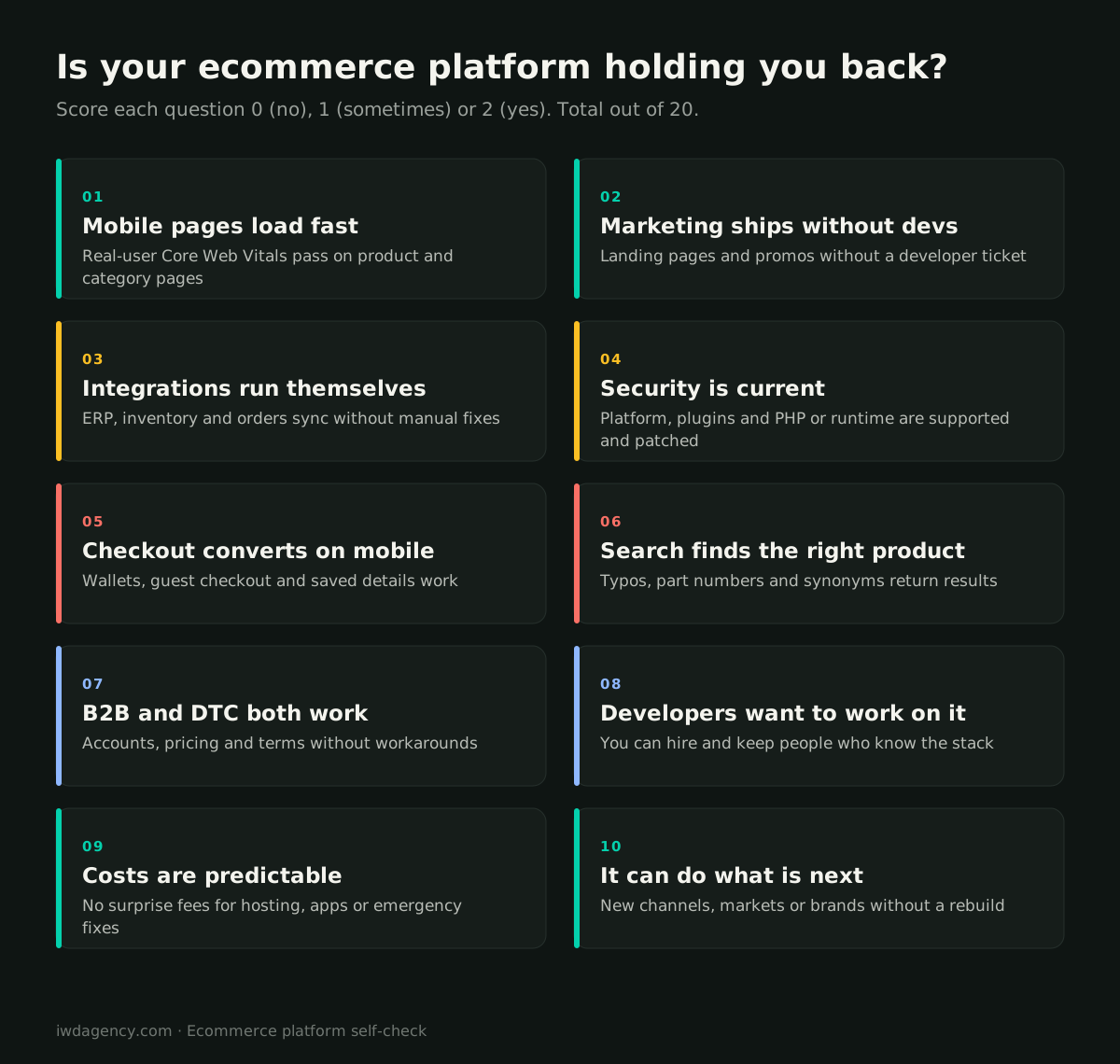
Score each one 2 for yes, 1 for sometimes or partly, and 0 for no.
1. Do your mobile product and category pages load fast for real users?
Check the Core Web Vitals report in Google Search Console, which uses real-user data, rather than a single lab test of your homepage. If product and category pages fail on mobile, you are losing both conversion and search visibility. Older themes and heavily customized front ends are the usual cause. On Magento, a Luma to Hyva migration can fix this without a full replatform.
2. Can your marketing team launch pages and promotions without a developer?
If every landing page, banner and promotion needs a ticket, your platform is slowing down your revenue team. Modern platforms and page builders let marketers ship most content changes themselves.
3. Do your integrations run without manual fixes?
Think about the ERP, inventory, pricing, fulfillment and CRM. If someone corrects orders, stock or customer records by hand every week, the integrations are fragile, and they tend to get worse as volume grows.
4. Are your platform, plugins and runtime supported and patched?
Unsupported software stops receiving security patches. Check the support status of your platform version, every plugin or extension, and the underlying language runtime (for example, PHP or .NET versions). Running unsupported software is a security and compliance risk, and payment card rules expect systems to be kept patched.
5. Does checkout work well on mobile?
Test it yourself on a phone: guest checkout, digital wallets such as Apple Pay and Google Pay, saved addresses, clear shipping costs. An outdated checkout is one of the most expensive problems an older platform can have.
6. Does search find the right product?
Search for a typo, a part number, a synonym and a plural. If your search returns nothing or the wrong products, buyers who know exactly what they want are leaving. Older platforms often rely on basic database search.
7. Do B2B and DTC both work without workarounds?
If you sell to both consumers and businesses, can each group get the right prices, accounts, payment terms and experience? Separate sites, manual price lists and spreadsheet ordering are signs the platform can't do what the business needs. Our guide to B2B ordering portals covers what business buyers now expect.
8. Can you hire and keep developers who know your stack?
If only one person or one agency understands your platform, you have a key-person risk. Niche frameworks, heavily customized legacy builds and abandoned technologies make it hard to hire, and expensive when something breaks.
9. Are your costs predictable?
Add up licensing, hosting, apps and extensions, maintenance retainers and emergency fixes for the last year. If emergency work and surprise bills are a regular line, the platform is costing more than it appears.
10. Can it support what's next?
Think about your plans for the next two years: new markets, currencies, languages, brands, B2B, marketplaces, subscriptions. If each one sounds like a rebuild, the platform is limiting your strategy.
What your score means
| Score | What it suggests | Next step |
|---|---|---|
| 16 to 20 | Your platform is in good shape. | Keep investing in speed, content and conversion. Re-check yearly. |
| 10 to 15 | The platform works, but specific problems are costing you. | Fix the lowest-scoring areas first. A targeted upgrade may be enough. |
| 5 to 9 | You're likely paying a significant "platform tax" in time and lost sales. | Get an outside assessment and compare fixing vs. replatforming. |
| 0 to 4 | The platform is probably holding the business back. | Plan a replatform, and protect SEO and integrations when you do. |
Fix it or replace it?
A low score doesn't automatically mean you need a new platform. Plenty of problems can be fixed where you are:
- Speed often improves with a new front end or theme, image and script optimization, and better hosting.
- Security issues can often be resolved with an upgrade to a supported version, like the BinMaster upgrade to current Adobe Commerce and PHP, which also retired dead extensions and moved hosting.
- Integrations can be rebuilt or moved to middleware without touching the storefront.
Replatforming makes more sense when several of these are true at once: the platform is unsupported or abandoned, the code base is so customized that every change is risky, you can't hire people to work on it, and the business needs capabilities the platform can't offer. Our ecommerce replatforming team helps with that decision, and our store health check gives you an outside view of speed, code, integrations and SEO before you commit either way.
If you do replatform
The biggest risks are lost search rankings, broken integrations and a dip in conversion after launch. Our ecommerce migration checklist covers the 12 things to check in the first year after a move.
Common signs by platform type
- Aging PWA or headless builds: frequent breakage after updates, a small pool of developers who know the framework, and marketing teams unable to edit pages.
- Custom or legacy .NET builds: hard to hire for, slow to change, and integrations that live in custom code only one person understands.
- Outdated WordPress and WooCommerce stores: plugin sprawl, conflicts after updates, security patches that fall behind, and slow pages as the catalog grows.
- Unsupported Magento versions: no security patches, extensions that no longer work, and growing hosting and compliance risk. Our Magento migration services and Adobe Commerce migration teams handle these moves every month.
Scored under 15?
Book a free 30-minute assessment. Bring your score, and we'll tell you plainly which problems can be fixed where you are and whether a replatform is worth it. No pitch deck, no obligation.
Book a 30-minute assessmentMore guides for growing ecommerce teams
- Ecommerce migration checklist: your first year after a replatform
- B2B ordering portals: what contractors and retailers expect
- Ecommerce for lab and reagent suppliers, including punchout catalogs
- Selling technical and regulated gear online
- Running multiple brand stores on one platform
- CRO for considered, higher-priced purchases
Frequently asked questions
How do I know if I need a new ecommerce platform?
Warning signs include slow mobile pages, unsupported software, fragile integrations that need manual fixes, difficulty hiring developers for your stack, unpredictable costs and plans that the platform can't support. If several apply at once, a replatform is worth evaluating.
How long does an ecommerce platform usually last?
There's no fixed lifespan, but the platform version, extensions and front end all age. Many stores need a major upgrade or a new front end every few years and a full replatform less often, usually when the platform stops being supported or the business outgrows it.
Is it better to upgrade or replatform?
If the core platform is supported and the problems are specific (speed, a few integrations, security patches), upgrading or fixing is usually cheaper and faster. Replatforming makes sense when the platform is unsupported, too customized to change safely, or can't support where the business is going.
What are the risks of staying on an outdated platform?
Security vulnerabilities, compliance issues, slow pages that hurt conversion and search rankings, rising maintenance costs and dependence on a shrinking pool of developers. The risks grow over time.
How much does it cost to replatform an ecommerce site?
It depends on catalog size, integrations, customization and data migration. A useful first step is an assessment that compares the cost of fixing your current platform with the cost and payback of moving.